


Avigilon Alta Open
4.2564.00 Reviews
App Specs
- Version
- 3.5.2
- Updated On
- License
- Free
- Downloads
- 1,000,000+
- Developer
- Openpath Security, Inc
- Categories
- Business
- Platform
- Android, iOS
Screenshots
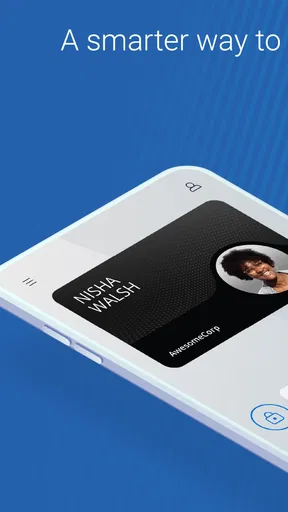
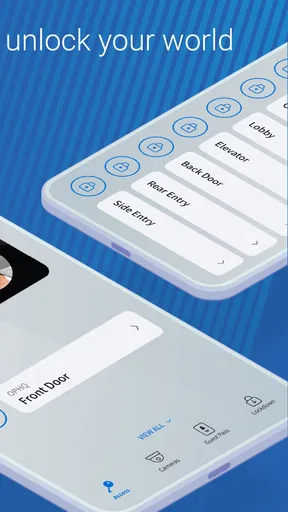
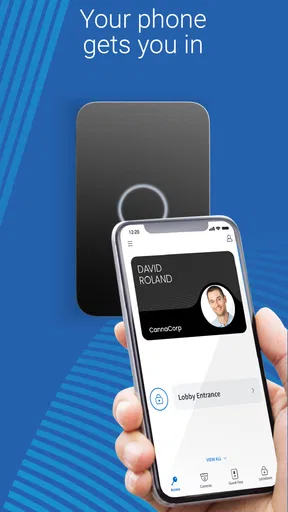

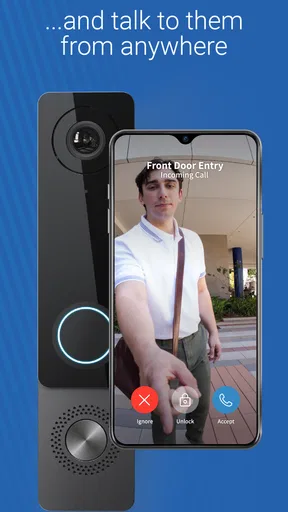
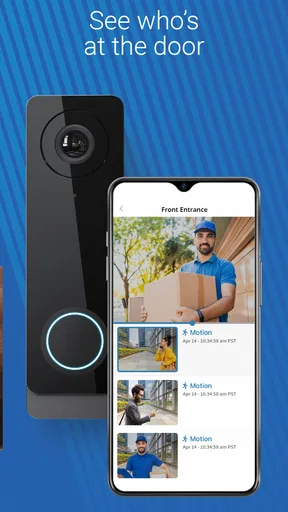
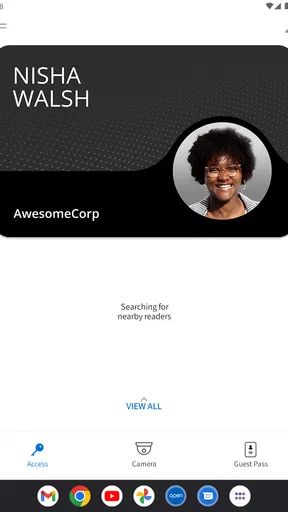
 Analysis by AppCompare
Before I would rely on a phone app to get through a door, I would check one basic thing: whether my workplace or building is actually set up to use it. Avigilon Alta Open is a business access app, not a universal key that works with any door. That distinction matters. The app can make an approved access routine feel quick, but the organization’s access system and the credentials assigned to you are what determine whether it will work at a particular entrance.
Start with the access you have been given
If you have installed the app but cannot use it at a door, first make sure you are signing in with the account your organization expects you to use. A personal email address or an account from another workplace may not be connected to the right access setup. If you were invited by an administrator, follow the instructions they provided rather than trying several accounts at random; repeated guesswork can make it harder to tell whether the issue is your sign-in or the building configuration.
It is also worth confirming that the entrance you are trying to use is meant to work with the app. A business may have several doors, and not every one necessarily follows the same access routine. If colleagues use a different method at a particular entrance, ask which method is intended there before assuming your phone or account is at fault. This small check can save time, especially when you are arriving for a meeting and people are waiting behind you.
Make the first attempt predictable
I would set up the app before I need it in a hurry: install it, sign in, and check with the person responsible for access about what to expect at your site. That gives you a chance to resolve account or enrollment questions while you are somewhere comfortable, rather than standing outside with a laptop bag and a line forming behind you. The app is free, but access to a building still depends on the organization’s own setup.
On the first visit, take a moment to learn the normal process at the entrance. Notice where people pause, whether they use a reader, and whether there are posted instructions. Keep your phone available and avoid trying to troubleshoot while blocking the doorway. If the first attempt does not work, step aside and ask an administrator or reception contact to check your access rather than repeatedly tapping without knowing what the system expects.
Recover without turning a small problem into a security problem
When an entry attempt fails, I would work through the simplest possibilities in order: check that the app is open and signed in, confirm you are at the correct entrance, and make sure you are following the site’s stated process. If those checks do not help, contact the building’s access administrator. They can determine whether your account is active and whether the door is configured for your access, which are questions you cannot reliably answer from the phone alone.
Keep an approved backup route in mind if your workplace offers one, such as asking reception or an authorized colleague for help. That is not a reason to share your account or let someone else use your phone credentials; it is a way to handle an occasional snag without weakening the building’s access rules. For a visitor or a contractor, the right next step may be to contact the person who arranged the visit, since their access may be managed differently from an employee’s.
Worth Reading Before You Choose

EA SPORTS FC Mobile 26 Is a Bigger Football Game, but It Takes Time

Flipboard Shows What News Apps Must Do Beyond the Feed

Switching to Android Auto Means Rethinking Your Driving Routine

Google Calendar Makes a Crowded Week Easier to Manage

Ludo King Makes the Most of the Minutes Between Plans

Baby Panda World Brings Quick Play to Modern Phones, but Its Game Library Feels Busy
What is Avigilon Alta Open?
So, what exactly is Avigilon Alta Open? In a nutshell, it's a comprehensive security management platform designed to integrate and streamline various security systems. Whether you're dealing with video surveillance, access control, or alarms, this app has got you covered. The developers have gone all out to ensure that users can manage their security needs efficiently without needing to switch between multiple apps or systems.
User Interface and Experience
First impressions matter, right? Well, Avigilon Alta Open scores high on this front. The interface is clean, intuitive, and remarkably user-friendly. Even if you’re not particularly tech-savvy, navigating through the app feels like a breeze. Everything is laid out logically, so you’re never more than a few taps away from where you need to be. The color scheme is easy on the eyes, which is a blessing when you’re staring at screens all day.
Features That Stand Out
The app is jam-packed with features that make managing security a seamless experience. Here are a few highlights:
- Real-time Monitoring: You can keep an eye on your premises anytime, anywhere. The live video feed is smooth and reliable, which is crucial when immediate action is needed.
- Custom Alerts: Get notifications for specific events, like a door being forced open or an unexpected visitor. This means you’re always in the loop without being overwhelmed by unnecessary alerts.
- Integrated Systems: The beauty of Avigilon Alta Open is how it brings together different security systems. Whether it’s video, access, or alarms, everything works in harmony.
- Remote Access: Need to check something while you're away? No problem. The app allows for comprehensive remote management, ensuring you have control wherever you are.
Setup and Configuration
I know what you’re thinking: "Setting this up must be a nightmare." Surprisingly, it’s not! The setup process is shockingly straightforward. The app guides you through each step, and before you know it, you’re fully operational. If you're integrating existing systems, the app provides clear instructions on how to sync everything seamlessly. It’s almost like having a personal IT assistant in your pocket.
Performance and Reliability
Performance-wise, Avigilon Alta Open is a rockstar. The app is quick and responsive, with minimal lag even during peak usage times. Reliability is crucial for any security app, and Avigilon Alta Open doesn’t disappoint. It delivers consistent performance, ensuring that you’re never left in the lurch during critical moments.
Support and Community
Even with the best tools, sometimes you need a little help. Avigilon Alta Open offers robust support options, from detailed FAQs to responsive customer service. The community forums are also a goldmine of tips and tricks shared by other users, which can be incredibly helpful if you’re trying to troubleshoot or optimize your setup.
How it fits into a real workday
The strongest use case is a workplace where staff already rely on a compatible access setup and need a convenient way to handle entry alongside other security tasks. Imagine arriving before reception opens: rather than carrying a separate access token, you use the phone-based process your organization has approved. Later, someone responsible for the site can check the relevant security information through the same broader system. That can make a fragmented routine feel more joined up, though it does not remove the need for clear rules about who can access which areas.
For an office manager, the practical benefit is less about novelty and more about reducing the mental load of switching between systems. If access control, video, and alarms are part of the organization’s setup, having them associated with one platform may make it easier to investigate an event: first establish what happened, then review the information available to you, and finally pass the issue to the person who can act. I would still keep incident notes and follow the organization’s procedures rather than treating an app notification as a complete record or a substitute for judgment.
There is a useful trade-off here. Bringing security tools together can make routine checks more convenient, but it also means the app’s value depends heavily on how carefully the organization has configured the wider system. A well-prepared administrator can make the experience feel straightforward; a poorly explained setup can leave ordinary users unsure whether a problem is with their sign-in, the door, or their assigned access. Before rolling it out broadly, I would ask the administrator to explain the normal entry workflow and the fallback procedure in plain language.
Who benefits, and who may prefer another approach
I would recommend considering it for employees or authorized users at a business that already uses the relevant Avigilon Alta access environment. It is also more compelling for people who have a genuine need to check or manage security away from a desk, rather than someone who only wants a simple personal doorbell or a way to unlock a home lock. The business focus is important: this is not a general-purpose consumer security app, and installing it alone will not give a user access to a building.
If you are choosing a system for a small office from scratch, compare the full access-control arrangement, administrator tools, and the way staff will be enrolled—not just the phone app. A conventional badge-based process may suit a site that wants a physical credential or has staff who do not use smartphones for work. For a building already organized around a compatible digital system, however, using the app can be more convenient than carrying an additional credential. The better choice depends on the workplace’s equipment and policies, not on a blanket claim that phones are always easier.
Visitors, temporary workers, and people who rarely enter the premises should ask how their access is handled before relying on the app. They may need a different invitation or entry process from permanent staff. Similarly, anyone who prefers not to use a personal phone for work access should raise that concern with the organization and ask about its approved alternative. That is a practical policy question, not something a user should try to work around by sharing credentials.
Small checks that make troubleshooting easier
One useful habit is to separate a phone-side problem from an access-side problem. If the app will not open or you cannot sign in, note the exact point where it stops and contact support or your administrator with that detail. If you can sign in but entry fails at one door, report the entrance and the time of the attempt. Those specifics give the person responsible for the system a clearer starting point than “the app is broken.” Avoid sending passwords or sensitive access details in an informal message.
Another good habit is to keep your app and phone in a state you can use before arriving at a secure entrance. If you have changed phones, reinstalled the app, or are using a different account, check access with the administrator in advance rather than assuming your previous setup carried over. A security app is tied to an organization’s permissions, so replacing a device does not necessarily mean access will transfer automatically. Planning that check is especially helpful before an early start, a late shift, or a day when the usual support contact is unavailable.
For people who receive alerts, I would also agree on what each alert should trigger. A notification is useful only if the recipient knows whether to verify it, contact someone, or follow an established response plan. If several people receive the same messages, decide who owns the follow-up so that an alert does not become everyone’s responsibility and nobody’s task. That kind of coordination is a workplace practice rather than a feature, but it determines whether notifications help or simply add noise.
What to expect from the app and its limits
Avigilon Alta Open is a free business app from Openpath Security, Inc, with a 4.2 average from around three thousand ratings and over 500 thousand installs. It first appeared in 2018, and version 3.5.2 is listed for devices running Android 10 or newer. The Everyone content rating is reassuring for general access to the app, but it should not be confused with permission to enter a particular site; building access remains an organizational decision.
Those figures suggest that the app has a sizable user base, but they do not tell me whether it will work with your workplace’s equipment or policies. That is the first question I would settle before installing it. I would also treat the app as one part of a security arrangement, not as a guarantee that a door, camera, network, or administrator will always be available. If a system is having a wider outage or your account needs attention, the app cannot resolve that by itself.
As with any security tool, convenience should not encourage careless sharing. Keep your sign-in private, use only the access assigned to you, and report a lost or changed phone through your organization’s process. If you leave a workplace, follow its instructions for ending access rather than assuming that removing an app from your device is the whole offboarding process. These are simple habits, but they matter more than cosmetic preferences when a phone is part of an entry routine.
My practical verdict
For the right workplace, I can see the appeal: the app puts mobile access and broader security management within reach without asking users to juggle unrelated tools. Its usefulness is greatest when the organization has already done the work of configuring access, explaining the workflow, and giving people a reliable contact for problems. In that situation, the phone can make an ordinary arrival or a remote check feel less cumbersome.
I would be more cautious if you are looking for a standalone solution, expect it to grant access automatically, or need an app that works independently of a business system. It is also not the right answer for someone who wants to bypass an administrator or use another person’s credentials. Check that your organization supports it, confirm how your account is set up, and learn the fallback route before relying on it at a busy entrance.
In conclusion, if you’re in the market for a comprehensive yet easy-to-use security management solution, Avigilon Alta Open is definitely worth considering. It brings together multiple security features into one cohesive platform, making it easier to manage and monitor your systems effectively. Its user-friendly design and robust functionality make it a standout choice in the crowded field of security apps. So why juggle multiple systems when you can have everything you need in one app? Give it a try—you might just find that it’s exactly what you’ve been looking for.
Pros
- User-friendly interface with intuitive navigation.
- High-quality video streaming and playback.
- Robust security features for data protection.
- Scalable for small to large installations.
- Efficient mobile access for remote monitoring.
Cons
- Requires a stable internet connection.
- Limited offline functionality.
- Initial setup can be time-consuming.
- Some advanced features need additional fees.
- Occasional glitches in mobile app version.
FAQs for Avigilon Alta Open
What is Avigilon Alta Open used for?
Avigilon Alta Open is a comprehensive security management application designed for monitoring and managing surveillance systems. It integrates seamlessly with Avigilon's range of cameras and security devices, providing users with real-time video feeds, analytics, and alerts. This app is essential for businesses and organizations looking to enhance their security infrastructure with advanced technological solutions.
Is Avigilon Alta Open compatible with all mobile devices?
Avigilon Alta Open is available for both Android and iOS platforms, ensuring broad compatibility with most modern smartphones and tablets. However, it is essential to check the specific system requirements on the app's download page to ensure that your device meets the necessary specifications for smooth operation and optimal performance.
Does Avigilon Alta Open require a subscription or additional fees?
While downloading Avigilon Alta Open itself is typically free, utilizing its full range of features often requires a subscription or integration with Avigilon hardware. Costs can vary based on the level of service and features required, so it's recommended to consult with Avigilon's sales or support team for detailed pricing information tailored to your specific needs.
How secure is the data managed through Avigilon Alta Open?
Security is a top priority for Avigilon Alta Open, which employs advanced encryption protocols to safeguard all data transmitted through the app. Additionally, users can expect regular updates and patches that enhance security features, ensuring that sensitive information remains protected against unauthorized access and cyber threats.
What kind of support is available for Avigilon Alta Open users?
Avigilon provides extensive customer support for Alta Open users, including comprehensive online resources such as FAQs, user manuals, and troubleshooting guides. For more personalized assistance, users can also contact Avigilon's dedicated support team via email or phone for help with technical issues or inquiries about the app’s features.


